

Container calculator tutorial
Walk through the full optimizer at app.palletizr.com: named load plans, multi-SKU cartons, typed ocean freight on Results, shareable plan links, and PDF/CSV/JSON exports. Screenshots are from the live UI (Aug 2026).
Quick start (5 steps)
- New Plan in the header (New on mobile) — name the shipment and optional lane fields.
- Carton tab — add SKUs manually, from Library, or CSV import.
- Pallet and Container tabs — pick equipment (Auto container is recommended).
- Settings tab — click Start Optimization (requires at least one carton).
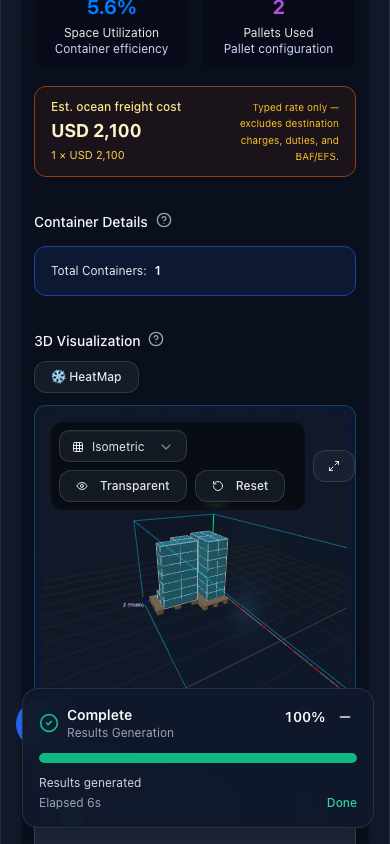
- Results — review metrics, 3D view, Est. ocean freight cost, Share link, and exports.
1. Create a load plan + ocean rate
Click New Plan and fill lane metadata. Ocean rate / container is your typed all-in quote per container — it powers the freight banner on Results after optimization (not a live market feed).

2. Add cartons (or import CSV)
Use Add Item for manual entry or CSV for bulk upload (template download inside the importer). Free tier: 3 SKUs and 999 cartons per run.

3. Configure pallets (optional)
On Pallet, turn pallets on or off. Pick EUR/EPAL/US presets or enter custom footprint, max stack height, and weight. Skip this tab if you floor-load cartons.

4. Pick container equipment
Auto (recommended) picks the smallest suitable dry box from your cargo. Select a second equipment type to plan a mixed fleet — multi-type fleets require Pro. Modes: Suggest mix, Exact mix, or Best rate (typed rate per type).

5. Start optimization
On Settings, choose mixed vs uniform packing and rotation rules, then click the green Start Optimization button. The app calls api.palletizr.com — you need a network connection.

6. Results, freight estimate, share link, exports
After a successful run, Results shows utilization, cartons packed, containers used, and a 3D view. When a rate is set on the plan, an amber Est. ocean freight cost banner appears (rate × container count, or per-type rates in fleet mode). Excludes destination locals, duties, and BAF/EFS.
- Share link — copies a URL with plan inputs in
?sp=(recipient re-runs optimization). - Export PDF — loading instructions for the warehouse.
- Export packing order (CSV) — placement sequence.
- Export Results — metrics spreadsheet.
- Export JSON — portable load plan backup.
- Finalize Plan — locks the plan (newsletter signup may be required first).
Typed rates only — see surcharge glossary and landed cost worksheet for full quote audits.

In-app help
Inside the calculator, tap Guide in the toolbar or the blue ? button (above the mobile tab bar) for an eight-screen walkthrough with layout-matched screenshots on phone and desktop.

Troubleshooting
- No results yet — run Start Optimization on Settings after adding at least one carton.
- Failed to fetch — network or API unreachable; retry on a stable connection.
- Share link invalid — plan too large (200+ SKUs); use Export JSON instead.
- No freight banner — enter ocean rate on the plan or per-type fleet rates.
- Hit a limit — Free: 3 SKUs, 2 containers shown, 3 saved plans; upgrade via Upgrade to Pro.